Azure DevOps
The MCP server for Azure DevOps, bringing the power of Azure DevOps directly to your agents.
⚡Config Installation
Add this to your claude_desktop_config.json:
{
  "mcpServers": {
    "azure-devops": {
      "command": "npx",
      "args": [
        "-y",
        "@modelcontextprotocol/server-azure-devops"
      ]
    }
  }
}* Note: Requires restart of Claude Desktop app.
Deployment Infrastructure
Adoption Framework for Azure DevOps
Before installing any skill, define a clear objective and measurable outcome. A useful implementation question is: what workflow becomes faster, safer, or more reliable after this skill is active? If that answer is vague, delay rollout and tighten scope first.
For most teams, a low-risk pattern is preview-first rollout with one owner, one test scenario, and one rollback plan. Capture failures in a structured log so quality decisions are evidence-based. This is especially important for skills that touch file systems, external APIs, or automation chains with downstream side effects.
- Define success metrics before installation.
- Validate permission scope against policy boundaries.
- Run one controlled pilot and document failure categories.
- Promote only after acceptance checks pass consistently.
Pre-Deployment Review Questions
Use these questions before enabling the skill in shared environments. They reduce surprise incidents and make approval decisions consistent across teams.
- What data can this skill read, write, or transmit by default?
- Which failures are recoverable automatically and which require manual stop?
- Do we have verifiable logs that prove safe behavior under load?
- Is rollback tested, documented, and assigned to a clear owner?
If any answer is unclear, keep rollout in preview and close the gap before production use.
Editorial Review Snapshot
This listing includes an editorial QA layer in addition to automated rendering. Review status is based on documentation depth, content uniqueness, and operational safety signals from the upstream repository.
- Last scan date: 2026-01-18
- README depth: 1013 words
- Content diversity score: 0.48 (higher is better)
- Template signal count: 0
- Index status: Index eligible
Recommendation: Pilot in a bounded environment first. Confirm observability and ownership before promoting to shared workflows.
Skill Implementation Board
Actionable utility module for rollout decisions. Use the inputs below to choose a deployment path, then execute the checklist and record an output note.
Input: Security Grade
B
Input: Findings
0
Input: README Depth
1013 words
Input: Index State
Eligible
| Decision Trigger | Action | Expected Output |
|---|---|---|
| Input: risk band moderate, docs partial, findings 0 | Run a preview pilot with fixed ownership and observability checkpoints. | Pilot can start with rollback checklist attached. |
| Input: page is index-eligible | Proceed with external documentation and team onboarding draft. | Reusable rollout runbook ready for team adoption. |
| Input: context tags/scenarios are missing | Define two concrete scenarios before broad rollout. | Clear scope definition before further deployment. |
Execution Steps
- Capture objective, owner, and rollback contact.
- Run one preview pilot with fixed test scenario.
- Record warning behavior and recovery evidence.
- Promote only if pilot output matches expected threshold.
Output Template
skill=azure-devops
mode=B
pilot_result=pass|fail
warning_count=0
next_step=rollout|patch|hold
🛡️ Security Analysis
Clean Scan Report
Our static analysis engine detected no common vulnerabilities (RCE, API Leaks, Unbounded FS).
DocumentationREADME.md
⭐ Azure DevOps MCP Server
Easily install the Azure DevOps MCP Server for VS Code or VS Code Insiders:


This TypeScript project provides a local MCP server for Azure DevOps, enabling you to perform a wide range of Azure DevOps tasks directly from your code editor.
📄 Table of Contents
- 📺 Overview
- 🏆 Expectations
- ⚙️ Supported Tools
- 🔌 Installation & Getting Started
- 🌏 Using Domains
- 📝 Troubleshooting
- 🎩 Examples & Best Practices
- 🙋♀️ Frequently Asked Questions
- 📌 Contributing
📺 Overview
The Azure DevOps MCP Server brings Azure DevOps context to your agents. Try prompts like:
- "List my ADO projects"
- "List ADO Builds for 'Contoso'"
- "List ADO Repos for 'Contoso'"
- "List test plans for 'Contoso'"
- "List teams for project 'Contoso'"
- "List iterations for project 'Contoso'"
- "List my work items for project 'Contoso'"
- "List work items in current iteration for 'Contoso' project and 'Contoso Team'"
- "List all wikis in the 'Contoso' project"
- "Create a wiki page '/Architecture/Overview' with content about system design"
- "Update the wiki page '/Getting Started' with new onboarding instructions"
- "Get the content of the wiki page '/API/Authentication' from the Documentation wiki"
🏆 Expectations
The Azure DevOps MCP Server is built from tools that are concise, simple, focused, and easy to use—each designed for a specific scenario. We intentionally avoid complex tools that try to do too much. The goal is to provide a thin abstraction layer over the REST APIs, making data access straightforward and letting the language model handle complex reasoning.
⚙️ Supported Tools
See TOOLSET.md for a comprehensive list.
🔌 Installation & Getting Started
For the best experience, use Visual Studio Code and GitHub Copilot. See the getting started documentation to use our MCP Server with other tools such as Visual Studio 2022, Claude Code, and Cursor.
Prerequisites
- Install VS Code or VS Code Insiders
- Install Node.js 20+
- Open VS Code in an empty folder
Installation
✨ One-Click Install
After installation, select GitHub Copilot Agent Mode and refresh the tools list. Learn more about Agent Mode in the VS Code Documentation.
🧨 Install from Public Feed (Recommended)
This installation method is the easiest for all users of Visual Studio Code.
🎥 Watch this quick start video to get up and running in under two minutes!
Steps
In your project, add a .vscode\mcp.json file with the following content:
{
  "inputs": [
    {
      "id": "ado_org",
      "type": "promptString",
      "description": "Azure DevOps organization name  (e.g. 'contoso')"
    }
  ],
  "servers": {
    "ado": {
      "type": "stdio",
      "command": "npx",
      "args": ["-y", "@azure-devops/mcp", "${input:ado_org}"]
    }
  }
}
🔥 To stay up to date with the latest features, you can use our nightly builds. Simply update your mcp.json configuration to use @azure-devops/mcp@next. Here is an updated example:
{
  "inputs": [
    {
      "id": "ado_org",
      "type": "promptString",
      "description": "Azure DevOps organization name  (e.g. 'contoso')"
    }
  ],
  "servers": {
    "ado": {
      "type": "stdio",
      "command": "npx",
      "args": ["-y", "@azure-devops/mcp@next", "${input:ado_org}"]
    }
  }
}
Save the file, then click 'Start'.
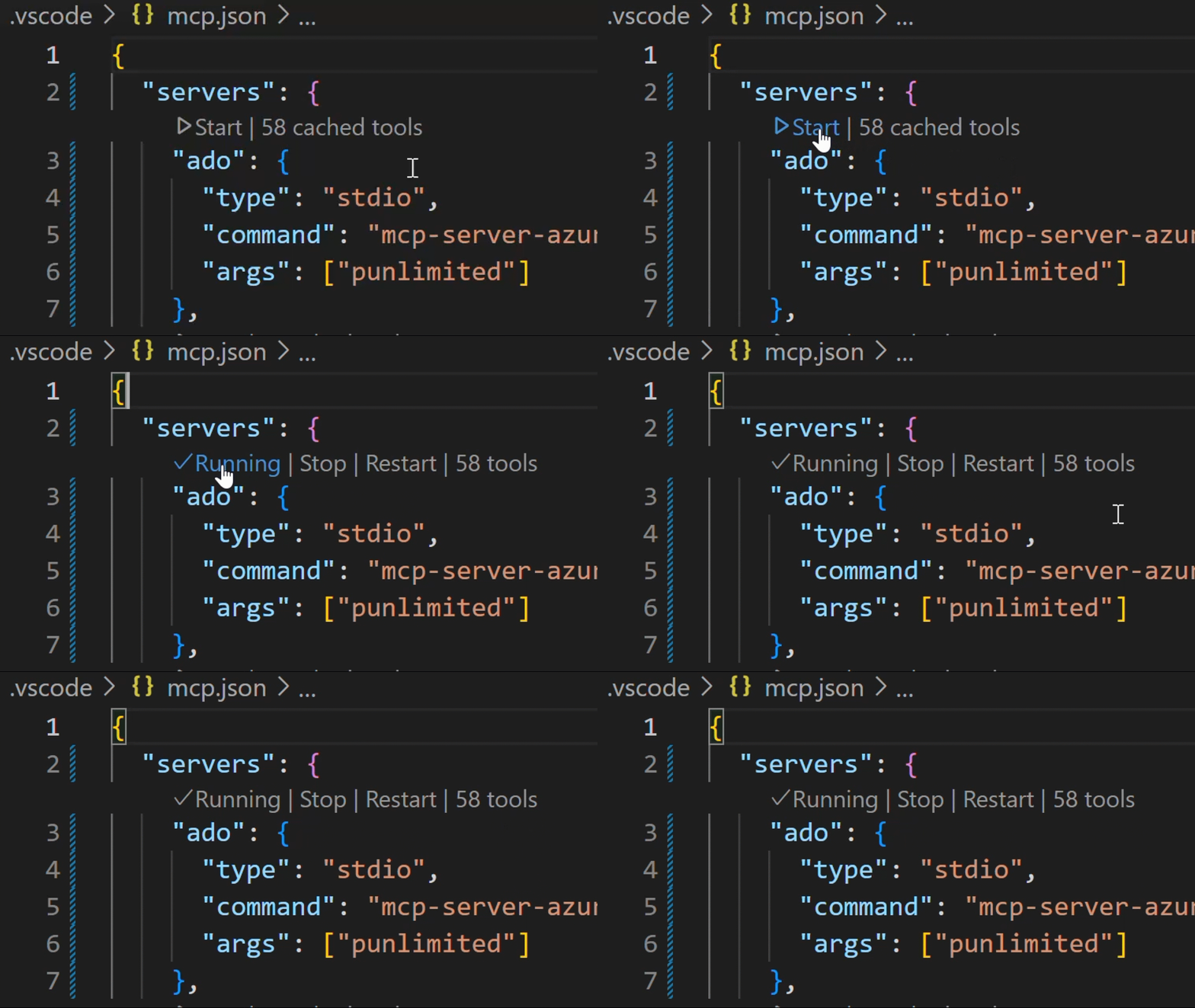
In chat, switch to Agent Mode.
Click "Select Tools" and choose the available tools.

Open GitHub Copilot Chat and try a prompt like List ADO projects. The first time an ADO tool is executed browser will open prompting to login with your Microsoft account. Please ensure you are using credentials matching selected Azure DevOps organization.
💥 We strongly recommend creating a
.github\copilot-instructions.mdin your project. This will enhance your experience using the Azure DevOps MCP Server with GitHub Copilot Chat. To start, just include "This project uses Azure DevOps. Always check to see if the Azure DevOps MCP server has a tool relevant to the user's request" in your copilot instructions file.
See the getting started documentation to use our MCP Server with other tools such as Visual Studio 2022, Claude Code, and Cursor.
🌏 Using Domains
Azure DevOps exposes a large surface area. As a result, our Azure DevOps MCP Server includes many tools. To keep the toolset manageable, avoid confusing the model, and respect client limits on loaded tools, use Domains to load only the areas you need. Domains are named groups of related tools (for example: core, work, work-items, repositories, wiki). Add the -d argument and the domain names to the server args in your mcp.json to list the domains to enable.
For example, use "-d", "core", "work", "work-items" to load only Work Item related tools (see the example below).
{
  "inputs": [
    {
      "id": "ado_org",
      "type": "promptString",
      "description": "Azure DevOps organization name  (e.g. 'contoso')"
    }
  ],
  "servers": {
    "ado_with_filtered_domains": {
      "type": "stdio",
      "command": "npx",
      "args": ["-y", "@azure-devops/mcp", "${input:ado_org}", "-d", "core", "work", "work-items"]
    }
  }
}
Domains that are available are: core, work, work-items, search, test-plans, repositories, wiki, pipelines, advanced-security
We recommend that you always enable core tools so that you can fetch project level information.
By default all domains are loaded
📝 Troubleshooting
See the Troubleshooting guide for help with common issues and logging.
🎩 Examples & Best Practices
Explore example prompts in our Examples documentation.
For best practices and tips to enhance your experience with the MCP Server, refer to the How-To guide.
🙋♀️ Frequently Asked Questions
For answers to common questions about the Azure DevOps MCP Server, see the Frequently Asked Questions.
📌 Contributing
We welcome contributions! During preview, please file issues for bugs, enhancements, or documentation improvements.
See our Contributions Guide for:
- 🛠️ Development setup
- ✨ Adding new tools
- 📝 Code style & testing
- 🔄 Pull request process
⚠️ Please read the Contributions Guide before creating a pull request.
🤝 Code of Conduct
This project follows the Microsoft Open Source Code of Conduct. For questions, see the FAQ or contact [email protected].
📈 Project Stats
...(truncated)